What is Input Management?
Every day, companies receive large amounts of information in the form of documents, e-mail messages, forms, and data. This information arrives via numerous different channels and must be processed reliably, quickly, and in compliance with regulations. Input management includes all processes, technologies, and organizational measures necessary to make this processing as efficient as possible. This involves capturing, understanding, and structuring the incoming information and forwarding it to downstream systems or departments. Therefore, Input management is the basis for every digital business process.
Straight to:
Why is input management so important today?
Every company communicates constantly with many different parties, such as customers, suppliers, business partners, government agencies, and many more. In recent years, corporate communications have also become increasingly complex. Not only has the volume of incoming documents and data increased, but so has the variety of communication channels. Emails, forms, scanned letters, invoices, orders, and even voice files all have to be processed in a short period of time.
For most organizations, it is no longer a realistic option to handle these tasks manually, relying on specialist staff alone. To avoid long processing times and high error rates, a clear input management strategy and modern technologies are required. The ultimate goal is always the complete automation of input management.
Automated input management ensures that:
- all input channels are processed reliably,
- documents and data are converted into a uniform, structured format,
- workflows can run efficiently,
- the quality of information is assured,
- compliance and archiving requirements are met.
But which input channels are particularly relevant today, and what requirements do they place on input management?
The most important input channels
To better understand the tasks involved in input management, let's take a look at the most common input channels and their specific features.
Paper documents
Even in an increasingly digital world, paper mail continues to play an important role. This is particularly true in sectors such as insurance, administration, healthcare, and energy supply. At the same time, other sectors also see hardly any companies that are already completely paperless. Typical examples of paper documents include letters with inquiries or forms, contracts, receipts, invoices, and handwritten notes.
This is how paper documents are processed automatically:
-
Digitization (scanning): High-performance scanners convert paper documents into image or PDF files.
-
Image optimization: Images are straightened and aligned as needed, and blank pages are detected.
-
Text recognition (OCR): Printed and handwritten text is digitized and made machine-readable.
-
Classification: Identifies the document type (e.g., invoice, termination, application).
-
Data extraction: Reading of relevant information (e.g., customer number, contract number, amount).
-
Forwarding & archiving: Transfer to specialist processes or digital files.
The main steps in Input Management
Regardless of the channel, incoming information typically goes through four main processes:
📥 Capture: Digitizing, importing, or transferring documents and data.
🗃️ Classification: Identifying the document type or case.
🔎 Extraction & validation: Reading relevant content (e.g., customer number, amounts, date fields) as well as quality assurance and plausibility checks.
➡️ Transfer & integration: Forwarding to specialist procedures, workflows, or CRM/ERP systems — including archiving or compliant storage.
Emails are one of the most important digital input channels. In addition to the message itself, emails often contain attachments that need to be processed separately. These attachments can be PDFs, Office documents, images, or scanned documents.
This is how emails are processed automatically:
- Retrieval from mailboxes: Emails are imported from individual or group mailboxes.
- Extraction of content: The body text, attachments, and metadata such as sender, subject, and date are read and structured.
- Classification of the entire email: Identification of the case: Is it an inquiry, complaint, request, or response?
- Extraction from attachments: Similar process to that used for scanned documents.
- Routing: The data from the email is transferred to the responsible department, the target system, or an automated workflow.
Online Forms
More and more companies are using web forms for customer communication. The advantage of digital forms is that the data is received in a structured format. This applies to online applications, contact forms, and uploads via customer portals. These are the most important steps in processing such form data:
- Validation of form fields: Forms are checked for mandatory fields, specified formats (e.g., IBAN, email), and plausibility. Data with irregularities is first removed from the automated process and then transferred to manual validation.
- Structured transfer of data: Since the data is already available in digital and structured form, it can usually be processed immediately.
- Processing of uploaded attachments: Classification and extraction work in the same way as for scanned documents.
- Further processing: The data is transferred to the subsequent systems or the responsible department for further processing.
Electronic Data Interchange
Data exchange via EDI (Electronic Data Interchange) systems plays a major role in communication between companies. Processing the data received in this way is also one of the tasks of input management. For example, order data, invoices, and customs documents are often exchanged in this way.
Compared to letters or emails, this data is much easier to process, as the steps of data extraction and classification are eliminated. The biggest challenge here is to create a structured system that centrally processes the various channels.

Automated Input Management with inovoo
The inovoo solutions NOVO CxP and NOVO AI Studio support all input channels and all types of documents – providing a holistic approach to input management. With the low-code platform NOVO CxP, you can connect all input channels directly and route the data to a central, automated process right at the start of your workflow. Depending on document types and industry requirements, the workflow is composed of different modules. For example, the process for processing emails might look like this:
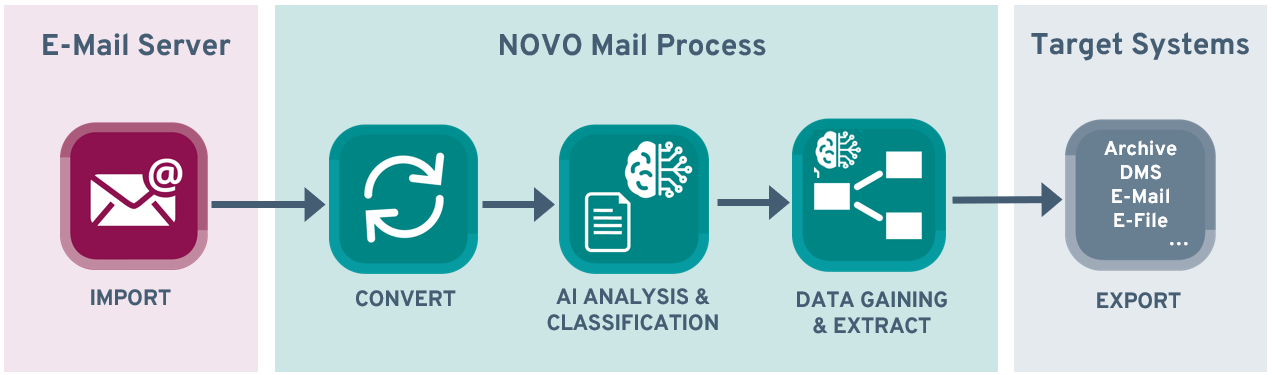
The email process with inovoo
For documents that are particularly complex or whose structure changes frequently, we recommend our AI solution NOVO AI Studio. It allows you to integrate powerful language models (LLMs) directly into your processes. There are AI process templates for many document types that you can use immediately. What makes NOVO CxP and NOVO AI Studio special is that you can flexibly combine AI and other IDP technologies from — for maximum automation and resource efficiency.
Conclusion: Input Management creates clarity in your communication
As the number of input channels increases, it becomes more difficult for companies to respond quickly and reliably. Modern Input Management allows you to cover all channels and ensure that every document is processed correctly.
The solutions from inovoo and the new possibilities offered by AI technologies make this easier than ever.
