What is Workflow Automation?
In most companies, there are standard procedures for routine business transactions that involve multiple steps. For example, a service department must identify the sender and their request for each inquiry so that it can then be assigned to the right contact person or system. Workflow automation refers to the automated execution of such routine business processes. Tasks, information, and decisions are automatically forwarded to subsequent systems, departments, or individual employees. The goal is to make processes faster, more efficient, and more transparent.
Workflow automation is one of the central aspects of digital transformation, especially in companies with large amounts of communication. It ensures that information no longer has to be transferred manually from system to system, but automatically arrives where it is needed.
Go straight to:
Why is Workflow Automation so important?
With the technological developments of recent decades — from OCR (optical character recognition) to artificial intelligence and LLMs — more and more companies and organizations want to automate routine tasks. Examples include reading customer numbers from incoming forms or automatically generating personalized responses to inquiries.
However, a holistic perspective is crucial in such projects. This is because the individual automation of separate tasks often leads to isolated solutions. Although this can result in localized efficiency gains, it also creates new problems. The result is often media discontinuity, in the form of printouts, manual data entry, or email forwarding. This leads to:
- long processing times
- high error rates
- lack of transparency
- unnecessarily high costs

A workflow is a clearly defined sequence of tasks that are performed in a specific order to achieve a certain goal. It specifies who does what, when, and with what information. Typically, a workflow begins with an event (e.g. an incoming request or document) and ends with a result, such as a decision, a response, or the document being filed in the target system. In between, there are individual steps such as review, forwarding, approval, or processing. In automated workflows, these steps run independently, one after another in a defined order.
A holistic approach to workflow automation, however, considers all the necessary systems and processing steps. In most cases, a single document or request goes through several steps and departments so that all the necessary information (e.g. various customer data) can be provided and the results can be sent to where they are needed. The goal should always be to create an automated end-to-end process, covering all steps from initially receiving a request to final processing and archiving. Only when all of these are intelligently linked together, you have a fully automated workflow. Tasks are automatically initiated, forwarded, and completed — around the clock and regardless of channel or data format. This enables you to achieve faster processing, better results, and significantly reduce the workload for your staff.
What kinds of workflows can be automated?
In general, all repetitive, rule- or data-based processes are suitable for workflow automation. Workflows that regularly involve large amounts of information that must be received, analyzed, forwarded, or processed are particularly relevant.
The content of the data and documents is not as important as the structure of the process, for example, whether it still involves many time-consuming manual steps. This can be the case when transferring data to specialist systems, for example. These exact steps can usually be handled more reliably and quickly by automated workflows. Automation is particularly worthwhile for the following processes:
- Incoming mail and email: Incoming information from emails, letters, forms, or attachments is automatically captured, classified, and distributed to the right person or system within the company. This ensures that no request is lost and that every inquiry ends up in the right process.
- Customer service: Service requests often arrive via a wide variety of channels. In automated workflows, these requests are analyzed, classified according to their subject and forwarded to the responsible teams or systems. This ensures fast and consistent processing at all times.
-
Invoice workflows: Here, automated workflows ensure that incoming invoices are verified, approved, and transferred to downstream systems. Automated decisions reduce processing times and error rates.
-
E-government processes: In the public sector, workflow automation plays a central role in the digitization of administrative services and communication between different institutions. This allows citizen requests, specialized procedures, and special eGov messages to be automatically captured, analyzed, and forwarded to the correct departments.
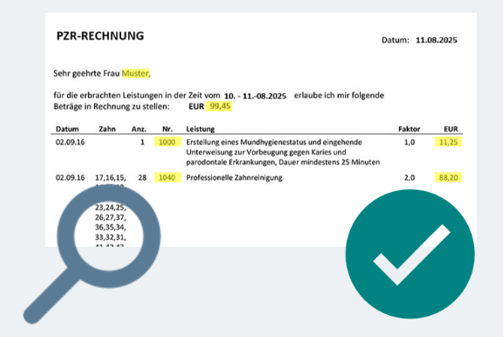
A typical example of an invoice workflow in German health insurance: the dental invoice
What steps make up an automated workflow?
Several components are required for a workflow to run automatically. Using a workflow management system or a special platform, you can specify the steps needed for a specific process. Typically, these will be the most important steps:
- Data capture: Incoming information reaches the company through various channels, such as email, scans, forms, or interfaces. These must be connected to the automated workflow.
- Data extraction: This is where the actual workflow begins. Relevant information is extracted from structured, semi-structured, or unstructured sources and made machine-readable. LEARN MORE
- Classification: Documents or data and their contents are automatically classified, e.g., by document type, subject, or responsibility. LEARN MORE
- Validation: The correctness or plausibility of the data is automatically checked by the system or, if necessary, by a human. LEARN MORE
- Transfer to target systems: The structured result data is transferred to ERP, CRM, DMS, or specialist systems, etc.
What is low code – and what benefits does it offer?
The term “low code” means that you can use and customize a business application even without extensive programming knowledge. In the field of workflow automation, low-code platforms enable workflows to be created and modified with minimal programming effort.
Instead of complex code, graphical interfaces with drag-and-drop elements and predefined building blocks are used. This allows specialist departments to independently manage processes within their area and adapt workflows to changing requirements as needed.
These are the advantages of low-code platforms:
- Fast implementation: Processes can be modeled quickly and put into productive use immediately.
- High flexibility: Adjustments to new requirements can be made at any time.
- Reduced IT workload: Specialist departments can design processes themselves.
- Transparency: Workflows are visually comprehensible.
- Scalability: New processes can be integrated more easily.
Workflow Automation with inovoo
With NOVO CxP (Communication Exchange Platform), inovoo offers a powerful low-code platform that allows you to automate your workflows with ease. Thanks to numerous modules, you can flexibly model your workflows and adapt them at any time. Existing systems such as ERP, CRM, DMS, or specialist applications are seamlessly integrated — without media breaks or data silos.
For workflows with particularly complex data or unstructured documents, we recommend NOVO AI Studio. This allows you to bring AI technology based on the latest LLMs directly into your processes.
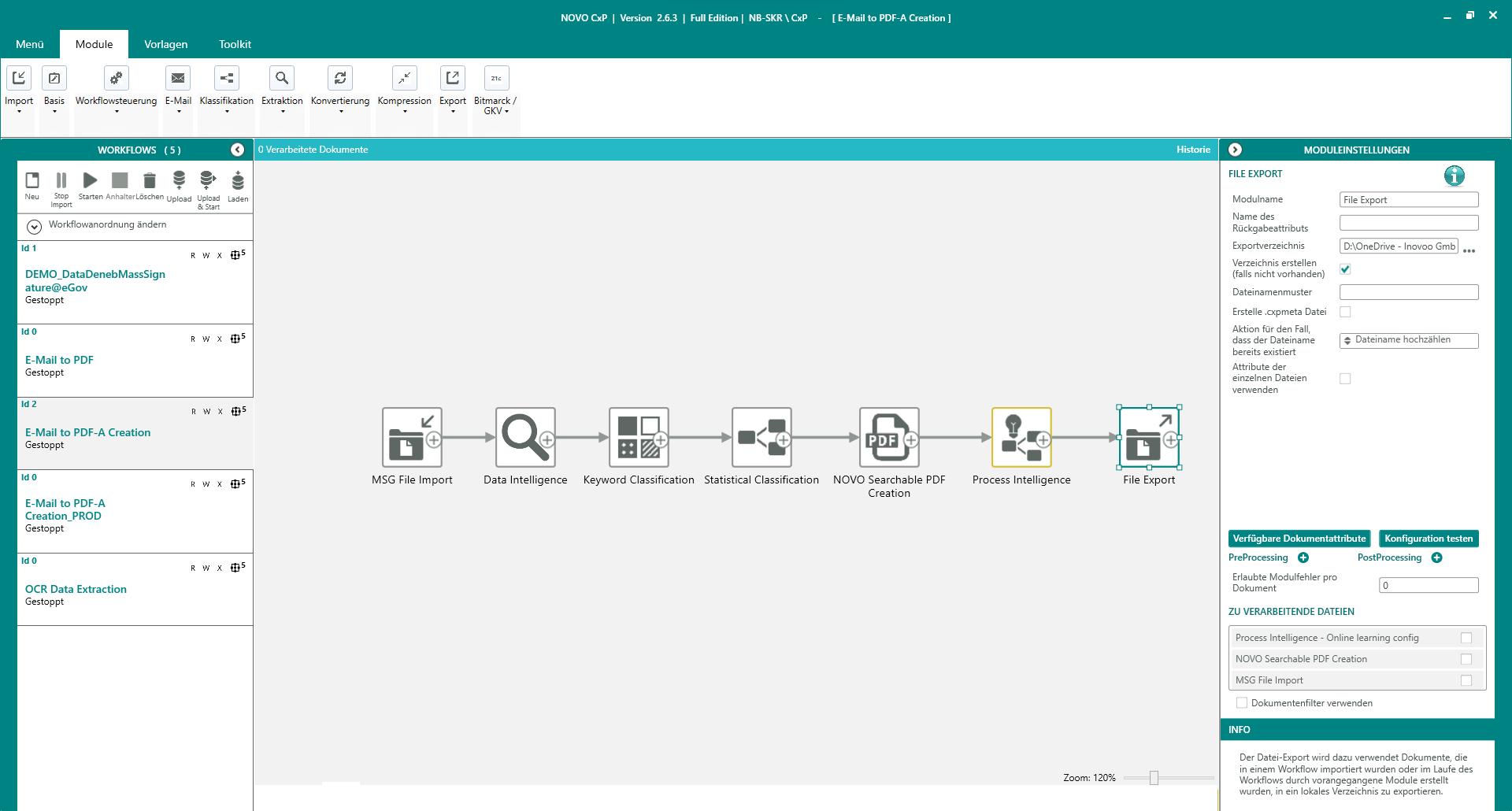
Example of an automated workflow in NOVO CxP
Conclusion: Achieve true process efficiency with Workflow Automation
Workflow automation is a holistic approach that makes processes truly more efficient. Instead of individual partial solutions, entire processes are fully automated. Whether in customer service, incoming mail or invoice processing, automated workflows save resources, improve service quality, and ensure satisfied customers and employees. Low-code solutions such as NOVO CxP and NOVO AI Studio by inovoo enable intelligent and flexible workflow automation that is tailored to the requirements of your company.
